AI Worker Outcome Metrics
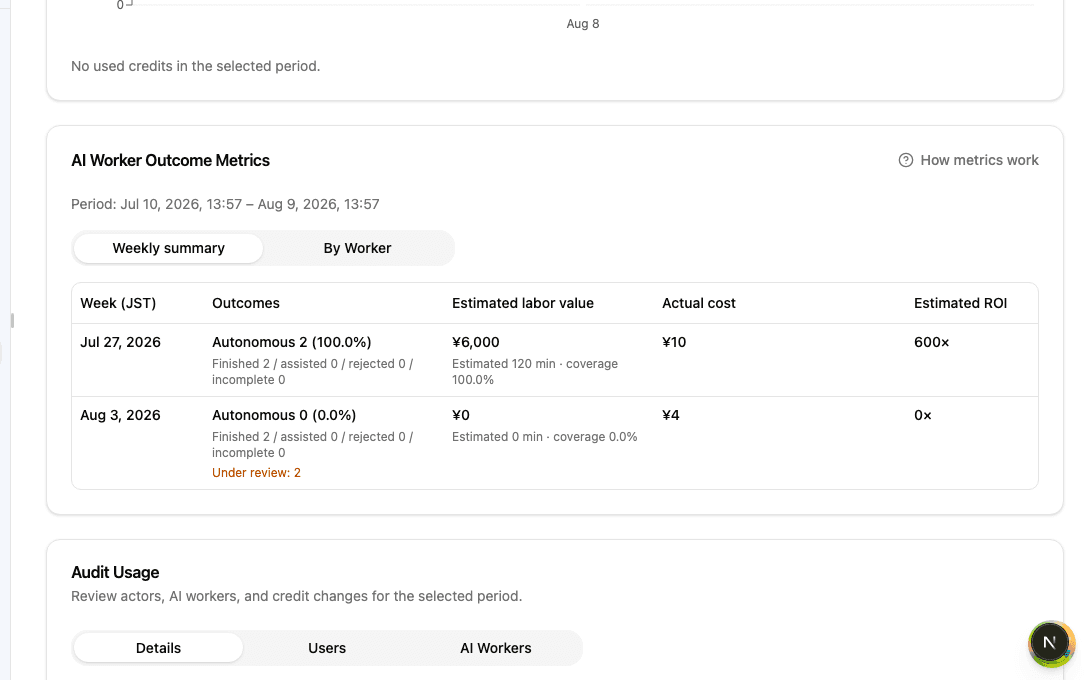
Outcome Metrics on the Dashboard show work an AI Worker completed without corrective instructions, alongside its estimated value and cost for the selected period. Use Weekly summary for trends and By Worker for the breakdown.
Overview
What autonomous completions, estimated labor value, actual cost, and estimated ROI mean—and how to read periods and review states.
Basics
The four metrics
- Autonomous completions: runs completed without corrective instructions that have passed the review period. The percentage uses decided runs only and excludes runs still pending review
- Estimated labor value: a conservative AI estimate of how long the same work would take a person, converted into a reference value in yen
- Actual cost: usage cost attributed to the relevant AI Worker runs
- Estimated ROI: estimated labor value divided by actual cost. When actual cost is zero, the Dashboard shows Not applicable
Periods and weekly boundaries
The period selected at the top of the Dashboard (Last 24 hours / 7 days / 30 days) also controls Outcome Metrics. Only runs that finished inside that period are included.
Weekly summary starts each week at Monday 00:00 JST. The first and last week include only the part inside the selected period. Weeks with no eligible runs are omitted.
Pending review and estimation coverage
Immediately after an autonomous run finishes, it enters a review period while Zemu checks whether the result receives corrective instructions. It appears as Pending review and is not yet counted as an autonomous completion. Once review finishes, the original completion week's totals are updated.
Assisted means a run completed after human correction, Rejected means the completed result required revision, and Incomplete means the run ended without completing. Coverage is the share of estimation-eligible runs for which a labor estimate was available. Treat value and ROI as directional when coverage is low.
Weekly summary vs By Worker
Use Weekly summary to see the team's overall trend. Use By Worker to identify which AI Worker contributed to outcomes, value, and cost. Worker rows in the selected period are shown without truncation, and deleted workers remain in the historical breakdown.
Past values can change when reviews or usage aggregation finish. Use Refresh on the Dashboard when you need the latest state.
Checklist
Select the period you want to inspect, then start with Weekly summary to review autonomous-completion and estimated-ROI trends.
Check the Pending review count and estimation coverage so provisional or under-covered values are not treated as final.
When you need to explain a change, switch to By Worker and identify the AI Worker behind it.