Back to release notes
v1.1.442026.06
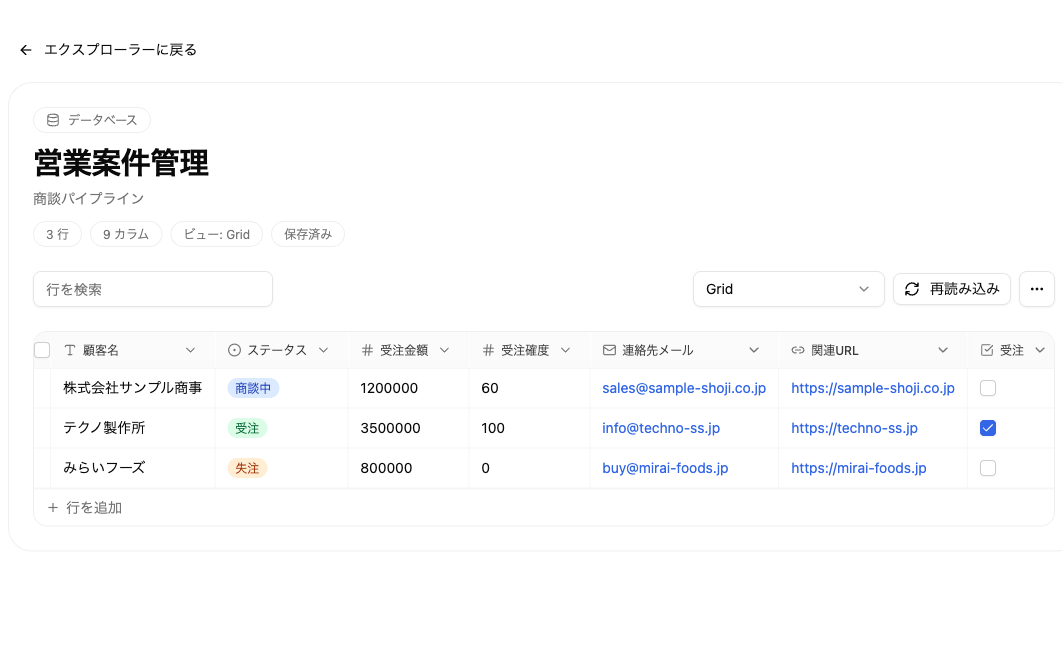
Knowledge databases redesigned into a table grid
v1.1.44 redesigns the knowledge database view into a table grid. The field types have expanded from three to nine — adding long text, checkbox, single select, multiple select, URL, and email — and you can now edit the schema directly from each column header: renaming fields, changing types, editing options, and deleting columns. Rendering is faster, too. You can also preview a file's contents before confirming the upload. When you open an empty folder, cards for creating a folder, a database, or a file now appear, so even first-time users can start creating content without getting lost.
Screenshots
Changes
Redesigned knowledge databases into a table grid. Field types expanded to nine (adding long text, checkbox, single select, multiple select, URL, and email), and you can rename fields, change types, edit options, and delete columns directly from column headers.
You can now preview a file's contents before confirming an upload. The file-selection display is also fully localized.
Opening an empty folder now shows cards for creating a folder, a database, or a file, so even first-time users can start creating content without getting lost.